
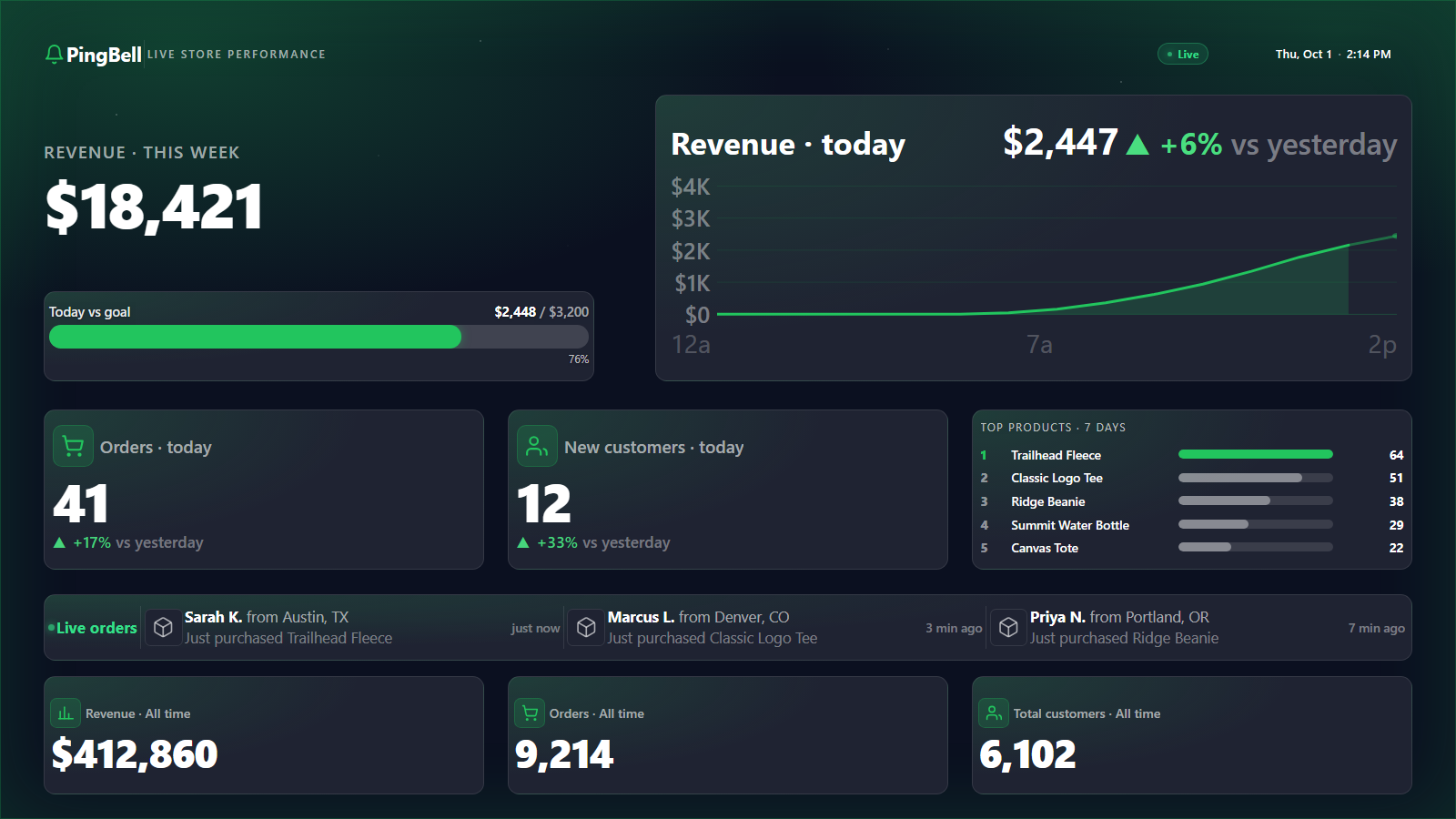
Every order your Shopify store takes, on every screen your team sees.
Most Shopify dashboards live inside Shopify Admin — one tab, behind a login, on one laptop. That’s fine for accounting. It’s a disaster for energy. The team needs the number to live outside the tab: on the wall of the warehouse, on the sales floor TV, on the phone of whoever is writing the next ad.
PingBell is a Shopify counter that reads every paid order the moment Shopify fires the webhook, and broadcasts it to a brandable live counter, a time-series graph, and a push notification — all at once. The counter can run on any Apple TV, Amazon Fire TV, or Android TV; on the iPhone in your pocket; or in a browser tab on any computer. You plug it in once and the team stops asking “how’d we do today?”
Who this is for
- Multi-channel DTC brands running Shopify alongside a retail location, a warehouse, or a customer-service floor — anywhere staff benefit from seeing revenue in real time.
- Growing Shopify teams (5 to 50 people) where ad buyers, merchandisers, and fulfillment people all care about daily revenue but sit in different rooms.
- Store owners running flash sales, BFCM, or product drops who want a thermometer on the wall during the critical hours.
- Agencies and consultants managing multiple Shopify stores who want a shared, branded dashboard to share with each client.
How PingBell solves it
Native Shopify integration. Install the PingBell app from the Shopify App Store. Authorize read access to orders. Pick paid orders as the trigger. No code.
A counter on every screen. The real differentiator is the TV app. Install PingBell on the TV in your office or warehouse, enter the short pairing code on the Screens page at my.pingbell.io (or scan the QR), and the revenue counter takes over the screen. Every new Shopify order pops the counter up in real time.
Three broadcasts at once. Every order fires three actions: the counter increments, the day’s graph gets a new point, and a push notification goes to the team phones with the sound of your choice from PingBell’s library of 70+ built-in sounds.
Tuned for Shopify-specific KPIs. Track revenue or order count. Attach a daily or campaign goal and the counter visually fills as you approach it.
Two ways to connect
There are two paths to connect your Shopify store to PingBell. Pick whichever fits.
Option A: The official PingBell Shopify App
Install PingBell from the Shopify App Store. Your store dashboard is built for you in about a minute, with your store’s history already on it, and it updates on every order.
Option B: Direct webhook from Shopify
Prefer not to install an app? Point a Shopify order webhook at a PingBell source and drive a counter from it.
Setup in under 10 minutes
- Install the app from the Shopify App Store. Search “PingBell” in your Shopify admin → Apps and authorize read access to orders.
- Create the counter. Connect Shopify as the source and pick paid orders as the event.
- Name and style it. “Revenue today”, “BFCM 2026”, or whatever your team will recognize on a TV from across the room. Pick fonts, colors, and a goal.
- Install the PingBell app on a TV. Apple TV, Fire TV, Android TV, Roku, or the TV’s browser — whichever you already have. A short pairing code appears on the TV.
- Enter the code on the Screens page at my.pingbell.io (or scan the QR). Cast the board you want to display. The TV takes over with a full-screen live number.
Total time, including walking to the conference room: under ten minutes.
Pricing for this use case
Most Shopify stores land on the Plus plan at $50/mo (billed annually; $75 month-to-month) — run counters for revenue, orders, AOV, and a per-product launch counter, design your own boards, and share access with up to 50 paired screens. Larger setups, or different content on different screens, belong on Team at $200/mo (billed annually; $300 month-to-month) with unlimited channels and a team of five.
See the full pricing page for the feature comparison.
FAQ
How does the PingBell Shopify integration work?
PingBell installs as an official Shopify app and subscribes to the orders/paid webhook (and a few others on request). Every time Shopify fires the webhook, PingBell increments the counter, adds a point to the graph, and sends a push notification. No polling, no delay, no missed orders.
Does PingBell work with Shopify Plus?
Yes. The app works identically on Shopify, Shopify Plus, and Shopify Starter. Plus stores often run multiple counters per-region or per-brand — there’s no counter limit on any plan.
Does it handle multiple Shopify stores?
Yes, but each store connects as its own data source. You can combine sources into one counter (e.g. all three of your regional stores feeding one global revenue counter), or keep them separate.
Will this slow down my Shopify store?
No. PingBell only receives webhooks from Shopify; it never queries your storefront or admin. Customers never hit PingBell’s infrastructure, so there’s no page-speed impact.
What happens if a webhook fails to deliver?
Shopify retries failed webhook deliveries for 48 hours. PingBell reconciles any late-arriving events, so the counter stays accurate even through brief network hiccups.
Get started
Install the PingBell app from the Shopify App Store or start a free 7-day trial. Connect your store in one click, pair a TV, and the next order your store takes will ring a bell.